OS: W10
PsychoPy version: 2024.2.4
Hi,
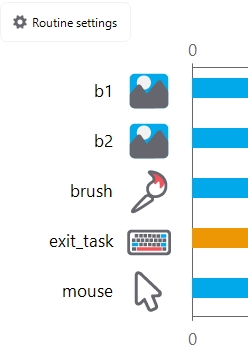
I have a brush component that I want to use to draw over two images (b1 and b2 in the 1st screengrab below) presented in the same routine side by side.
The issue is that the brush draws on top of the first image (b1) but under the second image (see 2nd screengrab below). I believe the order of the components is the correct one. If I disable b1 component then I can draw on b2.
I have set the brush component not to require a button to be pressed to start drawing but it did not resolve the issue.
As a temp solution I created an image the contains both images but I thought to post it here in case it is a bug. I attach the task (it’s a minimal example) for ease of replication.
Thanks
blank2|690x492
blank2|690x492
test_brush.psyexp (15.8 KB)