I have specified 3 position for 3 columns of my condition files (columns A,B, and C). However, I want to these columns were randomly assigned to these 3 positions in each trials.
I would appreciate it if somebody could help me. Thank you in advance.
You should read through your post again carefully and ask yourself this question: “Could someone who isn’t already familiar with my task and my requirements understand what I am asking?”
Unless a question is clear and precise, it simply can’t attract any answers.
Thank you Michael for your answer. You are right. My effort to simply explain my task can hinder understanding my task and my goals. So, let me clear this a bit more.
I have 2 questions (say, products) that each of them has two attributes. For example, a computer with the size of hard drive (attribute 1) and speed (attribute 2). Participants need to choose between 3 options of computers:
Having this in mind, I constructed my conditions as follow, with 2 products, each with 2 attributes and 3 options.
Then, this is an screenshot of my routine with 5 text input, one for products, one for attributes, and the other 3 for each options (a,b,c):
Now, my question is how can I randomize three options (a,b,c, which is circled in the pic above) to appear in 3 different positions? For now, I define the position of each options to be [0,0], [-.3,0], and [-.6,0]. However, I need these options randomly appear in this three positions.
You need to set that field to update “every repeat”. Currently you likely have it set as “constant”, so PsychoPy will be trying to set it at the beginning of the experiment, when the list of positions hasn’t yet been defined.
Thank Michael. Setting text’s position alone to ‘every repeat’ does not solve the problem, but when I changed the code, it worked. In the ‘begin experiment’ tab, I wrote:
positions=[[0,0],[-0.3,0],[-0.6,0]]
And in the 'begin routine, I wrote:
import random
positions=[[0,0],[-0.3,0],[-0.6,0]]
random.shuffle(positions)
Since I am at the beginning of learning programming, I would appreciate if you could see whether this code has no problem since I observe some patterns to be more presented than others (maybe it’s just an illusion).
Finally, the last problem is related to the data. This is a sample screenshot of data file:
As you can see, in the highlighted columns, participant responded 2 and 3 (I defined a keyboard response with 1,2,3 keys, each for one product). However, due to the shuffling the products, how can I know which option the participant select?
Sorry for all of these questions and thank you for your time.
Delete this. There is no point defining the list of positions at the beginning of the experiment, as it gets re-defined on every trial. Having it present at the beginning of the experiment can mask errors which might otherwise occur and be useful to see.
Don’t import random. Builder automatically imports the numpy random library, and its shuffle function. So, as suggested, just use shuffle(positions)
Since the changes you introduced to the code shouldn’t have had any useful effect, the issue becomes why the code apparently didn’t work as initially suggested. We should really solve that issue before moving on.
i.e. What did you mean by
What wasn’t working, and what change do you think addressed it?
Lastly, yes, you should explicitly save information about the target positions in the data file on each trial but let’s address the issues about the code apparently not working before we proceed.
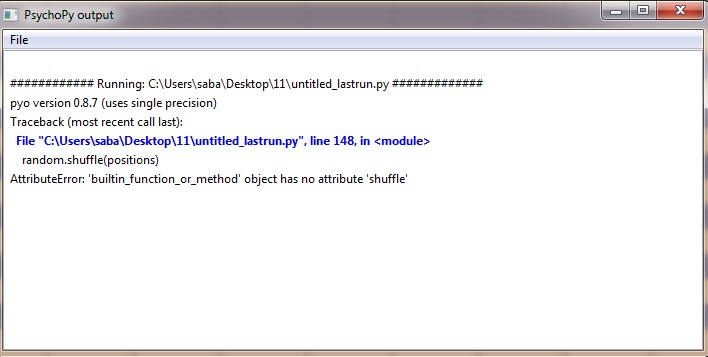
I think by inserting this code, we tell psychopy about our position which it demands at the previous error.
Moreover, as I insert import random in the beginning of the “begin routine” tab, no error would be presented and the experiment starts with no problems. I think this error is attributable to my numpy packages, since import random can solve it. However, I already install numpy using pip install and even manually.
No, all of these errors are likely due to the order of components in your routine. Make sure that the code component is shifted to the top: that way the positions variable is defined and shuffled before the text components attempt to refer to it. Right click on component icons to be able to move them up or down.
Putting code in the “Begin experiment” tab is not solving the problem, just hiding it.
Thank you Michael. It worked perfectly and everything looks great so far.
Now, I think we can focus on the data output which I explained already:
As you can see, in the highlighted columns, participant responded 2 and 3 (I defined a keyboard response with 1,2,3 keys, each for one product). However, due to the shuffling the products, how can I know which option the participant select?
You are right Michael. I spend some time asking some of these questions. Thank you for all of your generous help. Your recommendations and instructions helped me a lot and even improve my logic and intuition regarding experiment design.