Two issues I can spot so far in your code:
-
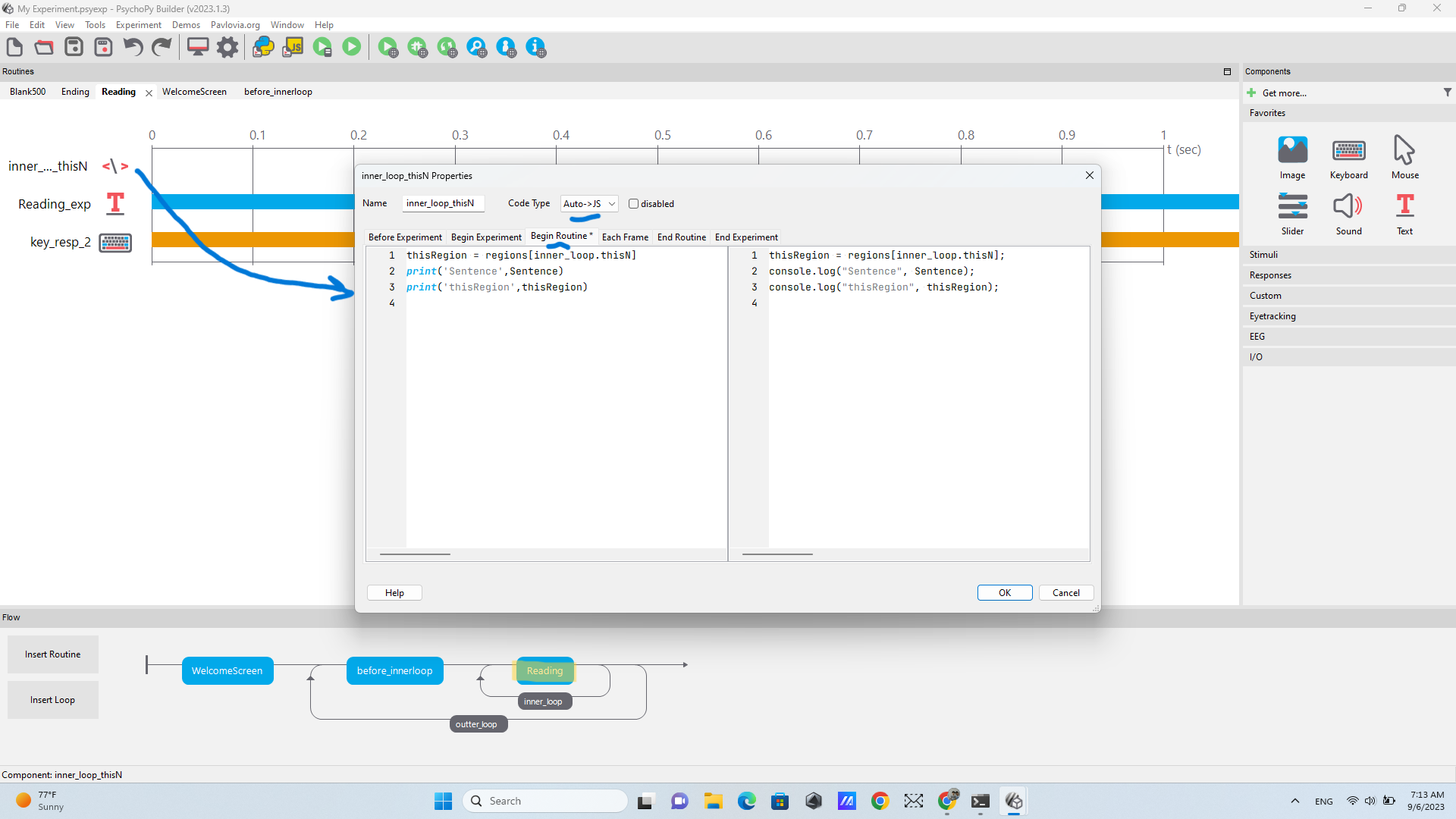
Your loop is called inner_loop so you need to use inner_loop.thisN in your code
-
The inner loop shouldn’t have a conditions file.
Two issues I can spot so far in your code:
Your loop is called inner_loop so you need to use inner_loop.thisN in your code
The inner loop shouldn’t have a conditions file.
@wakecarter
Morning 
Thank you 
I made some changes:
I used inner_loop.thisN in my code:
and my inner loop does not have a condition file anymore.
Now, I can run the experiment without any error, but the regions are not segmented 
You have already helped so much. If it is possible, please tell me about the next step.
Try moving the code component to the top of the routine so the code happens before the display.
Do you have $thisRegion set every repeat in your text component?
Use Ctrl-Shift-R or an incognito tab if you can’t see the latest version
Dear @wakecarter
Thanks
I moved the code component to the top:
then I typed $thisRegion in my text component named Reading_exp
When I run the experiment, a blank page appears.
This is also my spreadsheet:
To find out whether the issue is the text component or the variable add the following code to your code component:
print('Sentence',Sentence)
print('thisRegion',thisRegion)
Then look at the Developer Tools.
and look at “info” to see the results of the print statements.
I added the codes
and then I looked at Troubleshooting Online Studies — PsychoPy v2023.2.2
actually, no error appears on the screen. The only problem is that when I run the experiment, no text appears.
By “info” you mean the script generated by Psychopy?
Generating PsychoPy script…
########### Running: C:\Users\hesam\Desktop\My Experiment_lastrun.py ###########
938.0573 EXP Imported stimuli_1.xlsx as conditions, 5 conditions, 1 params
938.0586 INFO Loaded monitor calibration from [‘2023_08_14 18:25’]
938.0818 EXP Imported stimuli_1.xlsx as conditions, 5 conditions, 1 params
pygame 2.1.0 (SDL 2.0.16, Python 3.8.10)
Hello from the pygame community. Contribute - pygame wiki
Sentence /Everyone knew that/Meredith/read/everyplay/despite her busy schedule.
thisRegion
5.0880 WARNING User requested fullscreen with size [1024 768], but screen is actually [1920, 1080]. Using actual size
Traceback (most recent call last)
File “C:\Users\hesam\Desktop\My Experiment_lastrun.py”, line 393, in
regions = Sentence.split(‘/’)
AttributeError: ‘NoneType’ object has no attribute ‘split’
0.8897 WARNING Monitor specification not found. Creating a temporary one…
################# Experiment ended with exit code 1 [pid:7900] #################
957.7966 EXP Imported stimuli_1.xlsx as conditions, 5 conditions, 1 params
957.7986 INFO Loaded monitor calibration from [‘2023_08_14 18:25’]
If I need to send another thing, please tell me.
Sorry. I forgot you weren’t running it online.
Remove the / before the first region.
Thank you. You are great 
Ok, I will remove that.
yeah . we finally managed to do this. thank you
But the problem is that it shows only the first region. Here is the video of what happens when I run the experiment:
What’s the error message?
here is the script generated by Psychopy. Can this help us?
Generating PsychoPy script…
########### Running: C:\Users\hesam\Desktop\My Experiment_lastrun.py ###########
32.0419 EXP Imported stimuli_1.xlsx as conditions, 5 conditions, 1 params
32.0433 INFO Loaded monitor calibration from [‘2023_08_14 18:25’]
32.0654 EXP Imported stimuli_1.xlsx as conditions, 5 conditions, 1 params
pygame 2.1.0 (SDL 2.0.16, Python 3.8.10)
Hello from the pygame community. Contribute - pygame wiki
Sentence Everyone knew that/Meredith/read/everyplay/despite her busy schedule.
Traceback (most recent call last):
thisRegion Everyone knew that
4.5134 WARNING User requested fullscreen with size [1024 768], but screen is actually [1920, 1080]. Using actual size
File “C:\Users\hesam\Desktop\My Experiment_lastrun.py”, line 382, in
regions = Sentence.split(‘/’)
AttributeError: ‘NoneType’ object has no attribute ‘split’
################ Experiment ended with exit code 1 [pid:15240] #################
47.1962 EXP Imported stimuli_1.xlsx as conditions, 5 conditions, 1 params
47.1976 INFO Loaded monitor calibration from [‘2023_08_14 18:25’]
Okay. I’ve worked out the issue. The nReps for the inner loop is 1 so it immediately tried to display the first region of the second sentence.
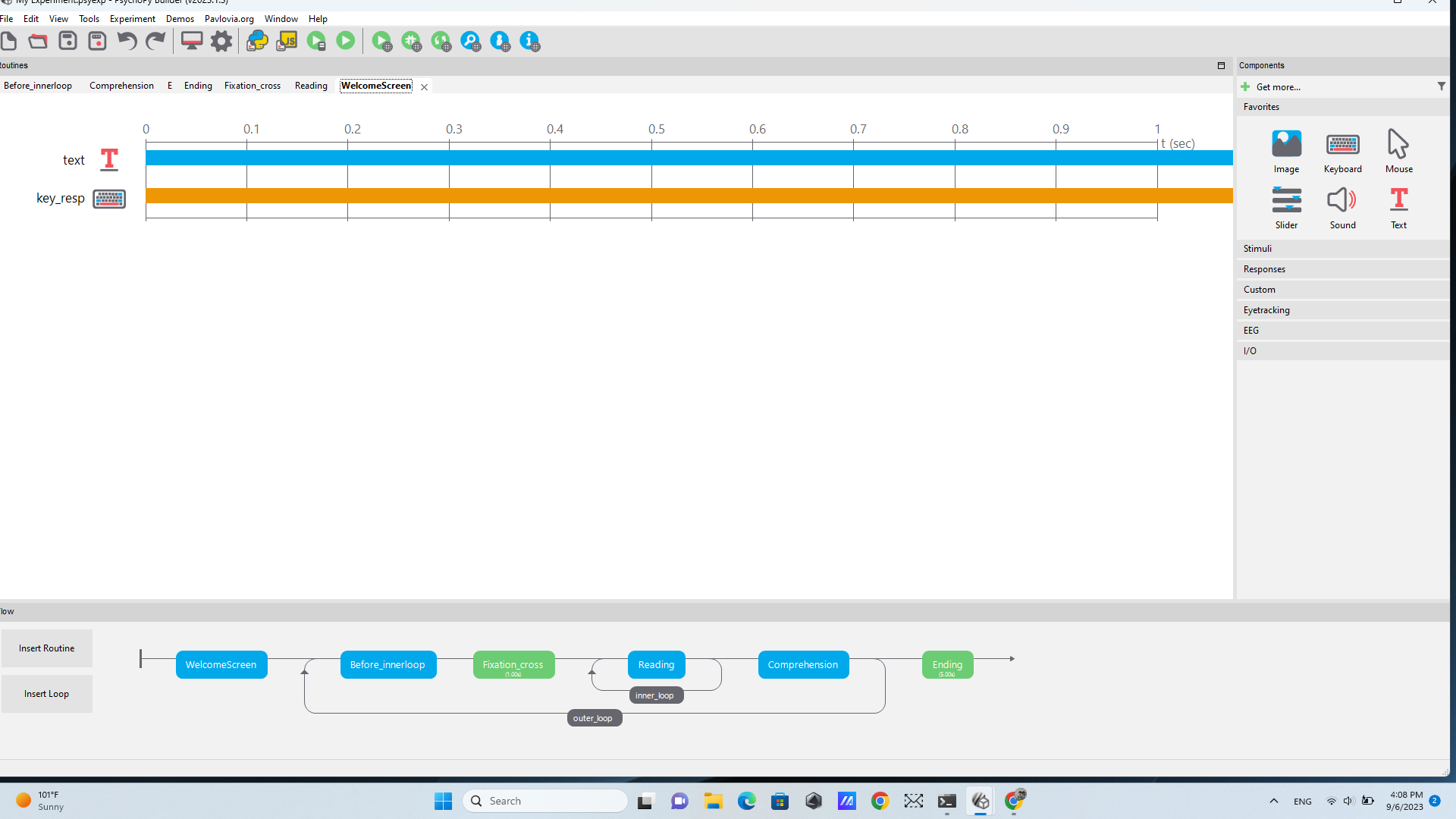
You need to know the number of segments before you start the inner loop so you need a new routine before inner_loop with a code component with regions = Sentence.split('/') (delete it from the other code component). The underneath write nRegions = len(regions) and put nRegions in the nReps field of the inner loop.
Great. Thanks.
some sentences may have 6 segments, while others 7 segments. Will that cause a problem?
if that may cause a problem, I can reduce the number of regions to 6.
The code means it isn’t a problem
Morning 
I entered the code here
I deleted regions = Sentence.split('/') from the other code component
I am not sure whether it is right or wrong but I interpreted the following sentence
as changing the number of repetition in the field of inner loop.
here is the video of what I have done so far + the error that pops up:
p.s. there is a cake adjacent to your profile. I guess it is your birthday. Happy Birthday.
Alignment in Python code is important. In inner_code you have a space in front of nRegions which is giving an error.
In your loop you have put 6 instead of nRegions
I don’t know how to thank you. You are second to none. I could not have done it without you
The problem is solved I added another sentence; it measured reading time without any problem.
I would also like to add wh-content questions such that participants can type their responses. Would you please help me on this?
You could add a routine with a text component for the question, an editable text box for the response and a keyboard response monitoring for ‘return’ or a button to click to submit.
thank you for your time and consideration.
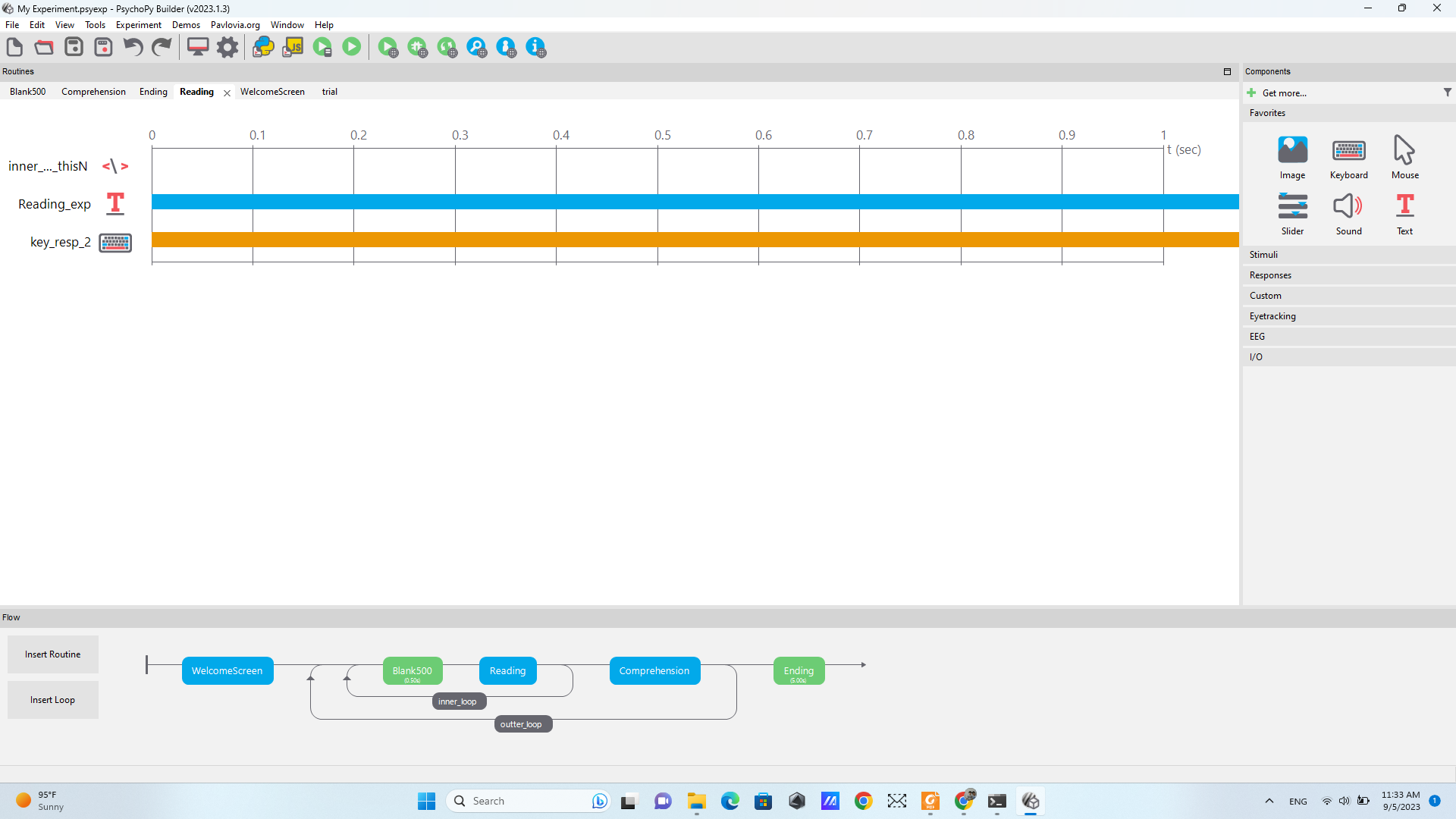
I successfully added comprehension questions to my experiment.
Everything is perfect, except that goodbye screen does not show up.
I think it is because of the loops. Would you please tell me how can I show the goodbye screen to my participants?
Sorry. I have another question. In my proposal I wrote that “each condition of a set will be distributed across participants equally using four counterbalanced lists so that participants see an equal number of sentences in each condition”.
Is it possible to do this on Psychopy?
You could insert a copy of the Welcome routine after the Beginning routine to see if it works there.
I suspect that the experiment is crashing before it gets to Goodbye because you have an extra empty row in your spreadsheet.
One way of counterbalancing is to have four spreadsheets and then some code in Begin Experiment to select one of them based on a value in the expInfo dialoguebox.
e.g.
conditionsFile = 'sentences4.xlsx'
if expInfo['group'] == '1':
     conditionsFile = 'sentences1.xlsx'
elif expInfo['group'] == '2':
     conditionsFile = 'sentences2.xlsx'
elif expInfo['group'] == '3':
     conditionsFile = 'sentences3.xlsx'
then put $conditionsFile in the outer loop